SimpleTodo
A fundamental to-do list application for Android that allows users to add, edit, and remove tasks. This app was developed to practice core Android development concepts, including UI management and local data persistence.
Role
Android Developer
- Timeline
- September 2021
Technologies
- Java
- Android SDK
Tools
- Android Studio
- Git
- GitHub
Background
SimpleTodo is a fundamental to-do list application for Android built with Java and the Android SDK. The project was designed to practice core Android development concepts including UI management, user input handling, and local data persistence. I handled the Android development, focusing on creating an interactive application that maintains task data across app sessions.
Solution
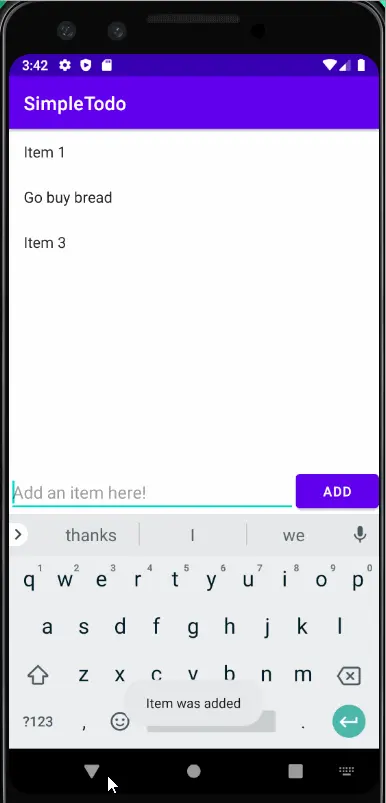
SimpleTodo provides a straightforward interface for managing a personal task list. Users can add new tasks through an input field, view all tasks in a scrollable list, and remove items through long-press interactions. I implemented local data persistence using Android's SharedPreferences to save and restore the task list when the app closes and reopens. The application includes a separate edit screen that allows users to modify existing tasks, with data passed between activities using intents.
Process
I began by designing the main activity layout with an EditText input field, an add button, and a RecyclerView for displaying tasks. I implemented the RecyclerView adapter to manage the dynamic list of items and handle user interactions. I added long-press detection to enable task deletion and created a separate activity for editing tasks. I integrated SharedPreferences to persist task data, implementing save and load methods that execute when the app lifecycle changes. I tested the application to ensure data persistence worked correctly across app restarts.
Final Product
Impact
The application successfully provides a functional to-do list with complete CRUD operations for task management, meeting the core requirements for a productivity tool. By implementing local data persistence using SharedPreferences, the app maintains user data across app sessions, ensuring that tasks are preserved when users close and reopen the application. This project effectively demonstrated practical application of fundamental Android development concepts, including Activity lifecycle management and efficient list rendering with RecyclerView.
Reflection
This project provided foundational experience with Android Activity lifecycle and basic UI component management. I learned to structure user interactions effectively and gained understanding of data persistence mechanisms in Android. Working with RecyclerView introduced me to efficient list rendering patterns. If I were to improve this project, I would implement a more robust data storage solution like SQLite for better scalability and add features such as task prioritization or due dates.